
2026: A Fresh Start for Your Business IT Setup
Start the year with a strong IT foundation—so you can focus on running and growing your business.
When you’re starting out, you wear all the hats—owner, salesperson, bookkeeper, and yes, “the tech person.” You set up email, buy a few laptops, maybe plug in a router and call it good. That’s normal.
But as your business grows—clients are waiting, deadlines stack up, your team expands, and sensitive data becomes mission‑critical—the stakes get higher. DIY stops cutting it. You don’t just need things fixed when they break. You need proactive, steady support and a clear IT strategy that scales with you.
This newsletter is your quick guide to the essentials every business needs—and how Managed or Co‑Managed IT with Pacific IT Support can give you the capacity, expertise, and calm you’ve been missing.
Download our guide: The No-Nonsense Guide to Business IT in 2026
Key Aspects Every Business IT Setup Needs
In the early days, a single shared inbox and a couple of cloud folders might be fine. But the moment your team grows or you begin handling client data (think construction plans, patient info, contracts, inventory), clarity and control become non‑negotiable.
Secure Access & Identity
When you’ve got project managers in Washington, a field crew in Maui, and vendor partners needing limited access, Multi‑Factor Authentication (MFA) and role‑based permissions prevent “everyone has access to everything” chaos.
Example: A real estate team shares listings with a staging vendor—limited access prevents accidental leaks of private client information.
Data Protection & Compliance
Backups, encryption, retention policies, and audit trails aren’t “nice to have” once you carry confidential plans, PHI in healthcare, or grant records for nonprofits.
Example: A construction firm needs past RFIs and as‑built documents available for years—retention policies and reliable backups prevent costly rework.
Collaboration Tools Configured Right
Whether you run on Microsoft 365 or Google Workspace, the difference between friction and flow is proper Shared Drives/Teams, naming standards, and controlled sharing.
Example: A manufacturing team co‑edits specs with a supplier—Shared Drives with external sharing rules keep collaboration smooth and secure.
Monitoring, Patching & Support
Laptops don’t patch themselves, and antivirus isn’t enough. Endpoint management keeps devices healthy, while a responsive help desk keeps people productive.
Example: Your clinic has staff on early shifts—when a laptop fails at 6 a.m., fast support matters.
Read our Guide: What Is IT Support for Business (And Why You Need It)?
Guide to Business IT (Click to download)
Managed vs. Co‑Managed IT
As you grow, you’ll either outsource fully or partner with your internal IT lead. Both approaches reduce risk and give you breathing room.
Managed IT (fully outsourced)
We operate as your IT department—strategy, setup, security, help desk, vendor management, and lifecycle planning. You get predictable costs and a single point of accountability.
Example: A nonprofit with no internal IT gets enterprise‑grade support and governance without hiring a full team.
Co‑Managed IT (partner with internal IT)
Ideal when you have an IT person or small team. We take on projects, security hardening, documentation, escalations, after‑hours coverage, and day‑to‑day help desk—so your IT lead can focus on higher‑value work.
Example: A health provider’s IT manager focuses on EHR integrations while we handle tickets, endpoint management, and security reviews.
Either way, the goal is the same: proactive support and a roadmap, not a pile of emergencies.
Read our guide: Is Your IT Ready for 2026? Here’s Why It Matters
Expertise You Get with an IT Partner
An outsourced IT partner like Pacific IT Support oversees every aspect of your IT—so nothing falls through the cracks and you’re never stuck reacting.
- Architecture & Setup
Clean identity management, secure file sharing, network and Wi‑Fi standards, and device baselines that scale as you add locations or staff.
Example: A multi‑site construction firm standardizes Wi‑Fi and security policies, so crews can move between offices without connectivity surprises.
- Security Program
MFA, endpoint protection (EDR), email security, backups, compliance policies, vendor risk reviews, and incident response playbooks.
Example: A real estate agency blocks spoofed emails that target wire transfers—saving money and reputation.
- Operational Excellence
Documentation, asset inventory, onboarding/offboarding, SLAs, quarterly reviews, and a roadmap aligned to your business goals.
Example: Manufacturing adds a second shift—onboarding is smooth because devices, accounts, and permissions are ready on day one.
- Vendor & Project Management
Internet providers, phone systems, printers, line‑of‑business apps, cloud migrations, and network upgrades—managed end‑to‑end with clear timelines.
Example: A healthcare clinic upgrades their network for telehealth—minimal downtime, maximum reliability.
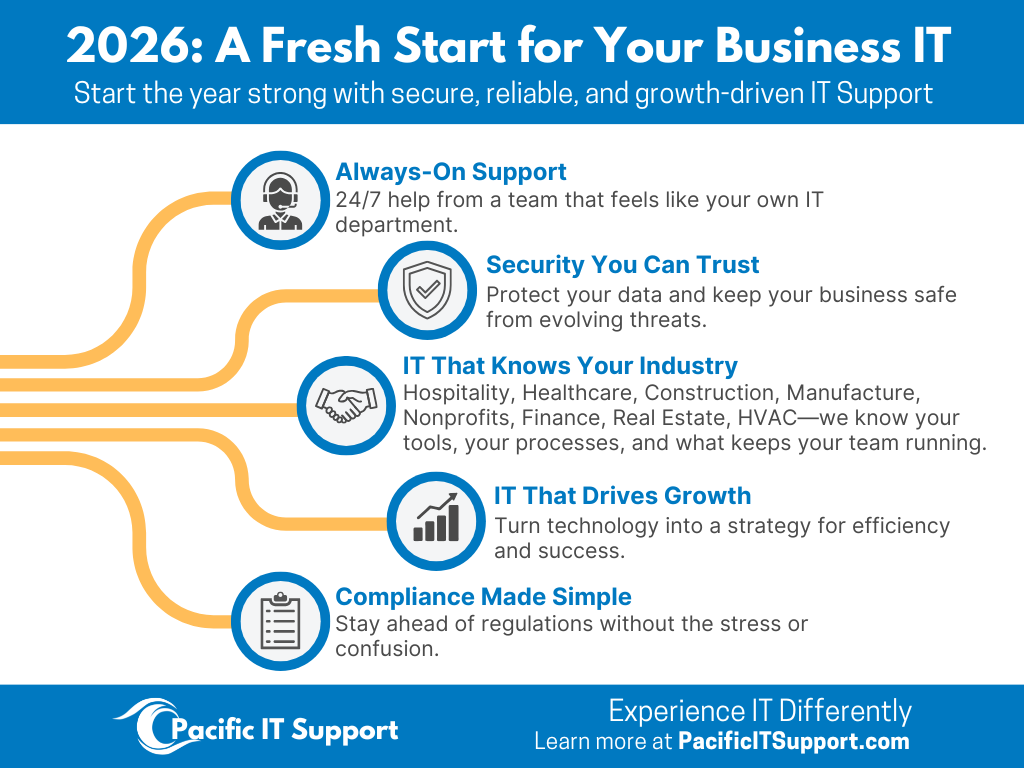
Why DIY Stops Working (and What to Do Instead)
When you’ve got clients waiting, deadlines to hit, and your IT needs evolve, reacting isn’t enough. You need:
- Proactive monitoring and patching to prevent outages.
- Clear policies so sharing and security aren’t guesswork.
- A steady support cadence so tickets don’t pile up.
- Strategy and planning so IT investments align with growth.
This is where a managed or co‑managed partner turns IT from a distraction into a growth enabler.
The Cost Advantage of an IT Partner
Outsourcing isn’t just about capacity—it’s about value and risk reduction.
- Predictable Monthly Costs
No surprise invoices. Budget with confidence and scale as needed.
- Better Tooling for Less
We provide enterprise‑grade monitoring, security, backup, and documentation platforms—shared across clients for lower per‑seat costs.
- Fewer Expensive Emergencies
Proactive care reduces downtime, emergency labor, data loss, and reputational risk.
- Smarter Use of Internal Staff
With Co‑Managed IT, your internal team focuses on strategic projects instead of resets and printer issues—higher ROI on the people you already have.
Ready for a Fresh Start?
If IT is on your mind for 2026, Pacific IT Support can help you start strong. It’s time to experience IT differently!