
Why Compliance Matters — Stay Audit‑Ready and Reduce Risk
Compliance can feel like extra paperwork—until a missed control turns into downtime, fines, or lost trust. If you’re running a growing organization, IT support for business isn’t just about fixing problems; it’s about keeping data safe, meeting regulations, and being audit‑ready every day.
At Pacific IT Support, we help teams in construction, healthcare, real estate, finance, manufacturing, and nonprofits across Washington, Maui and beyond keep compliance simple, practical, and aligned with how you work. Here’s a friendly guide to why compliance matters and how to make it part of your normal operations—not an annual fire drill.
Read also: Understanding Regulatory Compliance for Businesses
What “Compliance” Actually Means
Before we jump into steps and checklists, it’s helpful to define compliance in simple terms:
Compliance is following the rules that apply to your business—especially how you protect data, control access, and prove you’re doing the right things.
Those rules might come from laws (like HIPAA or state privacy laws), contracts (like a vendor agreement), or frameworks your customers ask for (like SOC 2 or ISO 27001). Practically, it looks like:
- Knowing what sensitive data you hold (patients, clients, donors, payments, plans).
- Making sure only the right people can access it.
- Keeping that data backed up, encrypted, and retained appropriately.
- Documenting your controls and training people—so you can prove it in an audit.
Real‑life example:
A healthcare clinic needs HIPAA‑aligned access to patient records. Compliance here means MFA on accounts, restricted sharing, documented policies, and proof that devices are patched and backed up.
Read also: Guide: Ensuring Compliance for Your Business
Why Compliance Matters (Beyond “Because the law says so”)
Compliance isn’t just a legal checkbox; it’s risk management with receipts. When controls are clear and enforced, you avoid surprises and build credibility with customers, partners, and regulators.
Here’s what good compliance protects you from:
- Operational risk: Downtime from ransomware or misconfigurations.
- Financial risk: Fines, penalties, and emergency labor.
- Reputational risk: Lost trust after data exposure.
- Contract risk: Losing a bid or partner because you can’t show controls.
Everyday scenario:
A real estate brokerage sets “Anyone with the link” on a deal folder to move fast. Later, a sensitive document surfaces publicly. With compliance‑aligned sharing policies and DLP rules, that leak is prevented—and the team still collaborates smoothly.
Common Compliance Risks by Industry
Different industries face different pressure points:
Healthcare (HIPAA):
- Situation: Front desk staff share credentials to “make coverage easier.”
- Risk: No accountability; potential unauthorized access to PHI.
- Focus: Unique accounts, MFA, access logging, encrypted backups, training.
Read also: HIPAA Mistakes You Didn’t Know You Were Making (And How to Fix Them Before an Audit)
Finance / Payments (PCI DSS, GLBA):
- Situation: Cardholder data stored in spreadsheets “just for a week.”
- Risk: Out‑of‑scope storage, unencrypted files, audit failure.
- Focus: Limit data storage, encrypt at rest/in transit, role‑based access, endpoint controls.
Construction (Contract & Data Privacy; CMMC if DoD-related):
- Situation: Plans shared broadly with “anyone with the link” to speed procurement.
- Risk: Confidential designs spread outside authorized domains.
- Focus: DLP, external sharing rules, vendor allow‑lists, retention of project records.
Read also: Building Safely: Essential IT Practices for Construction Companies
Real Estate (Privacy & Wire Fraud):
- Situation: Spoofed email instructs wire changes; team misses subtle domain mismatch.
- Risk: Fraud and funds loss.
- Focus: Email security (impersonation protection), user training, verification procedures.
Read also: Navigating IT and Cybersecurity Challenges in the Real Estate Industry
Manufacturing (Customer/IP protection; CMMC/ISO for contracts):
- Situation: Old shop PCs never patched; USB drives used for file transfers.
- Risk: Malware entry points and IP exposure.
- Focus: Endpoint management, patching, EDR, controlled removable media, network segmentation.
Nonprofits (Donor privacy and grant compliance):
- Situation: Donor lists shared to personal emails during a campaign rush.
- Risk: Privacy exposure and reputational harm.
- Focus: Sharing controls, domain restrictions, retention/eDiscovery, training.
Read also: Nonprofits and Tech Burnout: How Better IT Support Can Help Your Team Do More with Less
How to Stay Audit‑Ready
Here’s a quick mindset shift: audit‑readiness happens in small daily habits. If you can show what you do (policies), track that you do it (logs), and fix gaps (reviews), audits become straightforward.
Core practices to build into your operations:
- Know your data
Map what you store (PHI, financial, donor, IP), where it lives (Microsoft 365, Google Workspace, line‑of‑business apps), who needs it, and how it’s protected.
- Control identity & access
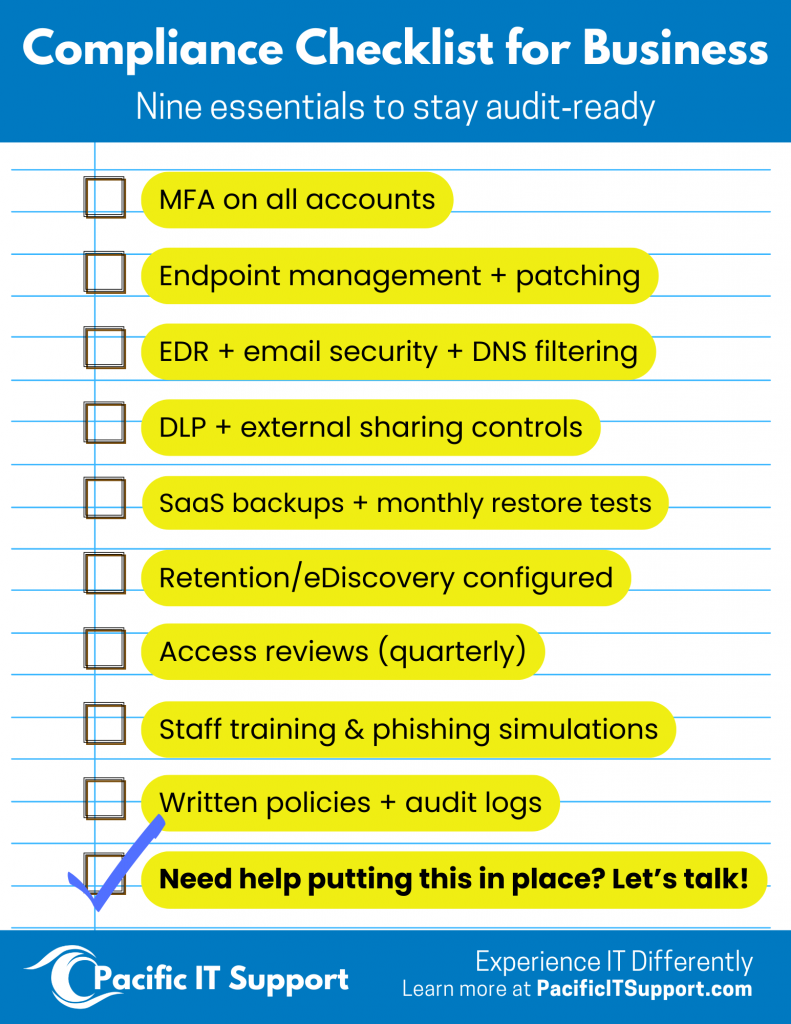
Unique accounts, MFA, and role‑based permissions—not “everyone is admin.” Review access quarterly. Disable accounts promptly when people leave.
- Protect endpoints & email
Keep devices patched and managed; use EDR for advanced threats. Add email security (impersonation and phishing protection) and web/DNS filtering.
- Secure collaboration
Standardize Teams/Shared Drives, external sharing rules, and DLP to prevent confidential data from leaving the organization unintentionally.
- Backups & retention
Treat Microsoft 365/Google Workspace like any system: back them up, test restores monthly, and apply retention policies to meet contractual/regulatory timelines.
- Document & train
Write simple policies (access, sharing, incident response). Train staff 2–4x/year with short sessions and phishing simulations.
- Monitor & improve
Use dashboards and alerts to spot issues (failed MFA, risky sign‑ins). Run quarterly reviews to close gaps—and keep a record of improvements.
Read also: Outsourcing IT: A Guide for Business Owners
Quick checklist :
How Pacific IT Support Keeps You Audit‑Ready
We make IT support for business simple and steady, with industry‑aware guardrails that fit how your team works. Whether you’re in construction, healthcare, real estate, finance, manufacturing, or a nonprofit, our job is to reduce risk and keep you ready.
What we deliver:
- Managed IT or Co‑Managed IT – Full outsourced department or partnered support with your internal team.
- Compliance & Governance – HIPAA‑aligned controls, DLP, access reviews, retention/eDiscovery, documentation, and audit preparation.
- Security Program – MFA, endpoint protection (EDR), email security, backups, monitoring, and incident response playbooks.
- Collaboration Setup – Secure Microsoft 365 or Google Workspace configuration with external sharing rules and sensible standards.
- Onboarding/Offboarding & Lifecycle – Role‑based access, provisioning, device baselines, and predictable hardware planning.
- Quarterly Reviews – Simple reports and roadmaps that prove what’s in place and what’s improving.
Ready to Make Compliance Simple?
If compliance—and a calm audit—is on your mind for 2026, we can help! Experience IT differently with Pacific IT Support.